
2026 年 10 月 13 日
Kanishka Rao,首席软件工程师
Gemini 4 Argon 标志着在物理理解、代码生成和视觉语义推理方面的跨越式进步——为整个机器人技术栈解锁了全新工作流,并加速迈向具身通用人工智能(Physical AGI)。
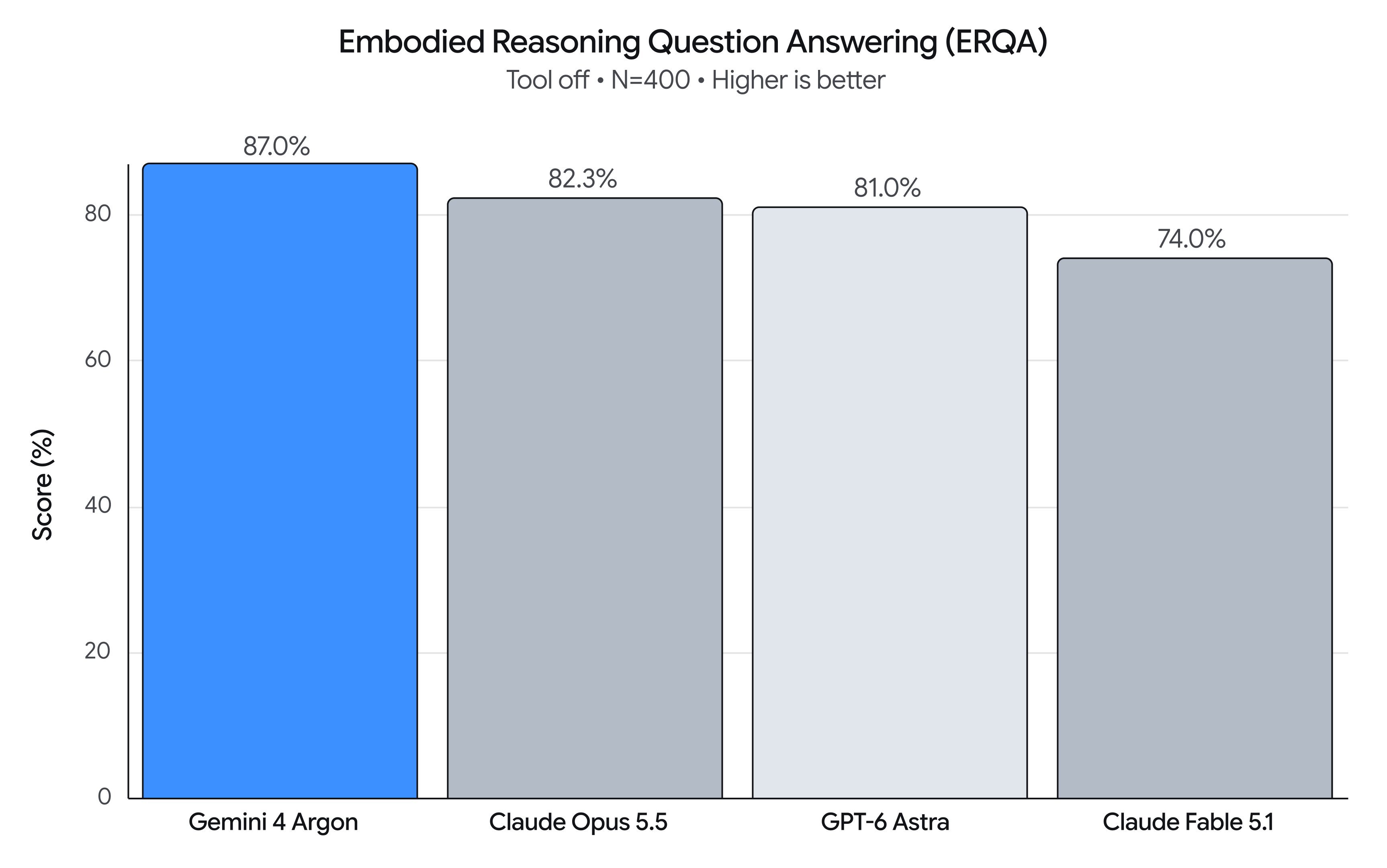
在具身推理(ERQA)基准测试中,你可以看到这种能力的跃升,该基准测试旨在评估模型在 3D 环境中理解和解决物理空间问题的能力。仅凭纯推理,Argon 就取得了 87% 的得分,超越了所有其他前沿模型。
作为通用的物理推理模型,Argon 可应用于机器人的整个生命周期。在这篇文章中,我们将分享 Argon 在四个关键领域的代表性提示词(Prompts):
- 机器人控制 → 结合 MuJoCo 仿真练习的移动操作、零样本(zero-shot)机器人控制,以及对视频世界模型的闭环引导。
- Real2Sim(现实到仿真)→ 从机器人相机输入、第一视角(egocentric)人类视频或手绘纸质草图中,重建经过物理校准的仿真孪生(simulation twins)。
- 物理理解 → 基于智能体的多模态后验标注(agentic multimodal hindsight labeling),包括对灵巧操作的精细理解、稠密价值函数(dense value functions)和进度估计。
- 研究与自我迭代 → 通过仿真进行动作改进,以及在实体硬件上的迭代式自我优化。
利用 Argon 解锁机器人控制
1. Spot 移动操作:结合 MuJoCo 练习将垃圾扔进垃圾桶
Argon 控制波士顿动力(Boston Dynamics)Spot® 四足机器人(12 自由度腿部 + 6 自由度机械臂)学习一项新技能:踩下脚踏式垃圾桶扔汽水罐。Argon 创建了一个脚踏式垃圾桶的铰接式(articulated)MuJoCo 数字孪生,在踩踏实体踏板并将汽水罐扔进打开的垃圾桶之前先进行动作练习。
Spot 移动操作 —— 现实到仿真再到现实(Real-to-Sim-to-Real)脚踏垃圾桶投放:Spot 拾起汽水罐,检查腕部相机,在 MuJoCo 中练习三腿三角支架平衡,踩下脚踏板,确认机械手在开盖垃圾桶上方居中,并将罐子扔入其中。
提示词:
There's a Diet Coke can behind you and another on the black table on your left.Use the spot-mobile-manipulation skill to pick them up and trash them in the black foot-pedal bin.Before stepping down on the pedal, verify in the front cameras that your front-right foot target is centered on the pedal, and use a 2-agent verification swarm (foot-verifier and hand-verifier) to verify both the foot-pedal step and the 3D hand-in-bin alignment before releasing.2. 零样本控制
Argon 控制一个简易机械臂将倒下的马克杯扶正,并将揉成一团的餐巾纸放入杯中。Argon 利用视觉坐标线框与动作原语(action primitives)进行推理,通过多轮交互完成此项任务。
左图:实体机器人第三人称视角;右图:标定后的腕部相机视图,带有投影的 2 厘米世界坐标系和夹爪闭合十字线准星。
提示词:
[Attached: wrist_cam.png, obs.json]
Task: Get the robot arm to reorient the mug upright and put the napkin inside the mug.
## Execution Discipline- Simply output 1 sentence observation followed immediately by your `curl` command (with `# Plan:` on Turn 1 and `# Thought:` on every turn). Everything needed is in `obs.json` and the calibrated reticle/grid drawn on `wrist_cam.png`.
## Visual Coordinate Reference (Annotated on wrist_cam.png)- `+X` (UP in image): Away from robot base | `-X` (DOWN): Towards robot base- `+Y` (LEFT in image): World left         | `-Y` (RIGHT): World right- `+Z`: Height above table                | `Yellow numbers`: World (X, Y) in centimetres (2 cm grid at `grid_z`)- `Cyan + crosshair`: Current 3D pinch center- `Cyan [ + ] brackets`: Current jaw opening and closing line- `Green line`: Current object long-axis orientation (`yaw_deg`: 0° = vertical along +X, 90° = horizontal along +Y)- `pitch_deg = 90°`: Straight down (-Z) top-down grasp/place; `pitch_deg < 60°`: Tilted coaxial approach along finger axis
## Closed-Loop Turn Workflow1. Inspect current state & view `wrist_cam.png`:   `curl -s http://127.0.0.1:8081/obs` (returns `ee_pos`, `holding`, `status`, `workspace`, `wrist_cam_path`).2. Select VLM call granularity upfront on Turn 1:   - Coarse (2–4 calls): `look_at` -> `grasp` -> `place` -> `done`   - Pre-Grasp Hover Verify (4–7 calls): `look_at` -> `goto(z=0.04)` (verify cyan `[ + ]` brackets straddle target) -> `grasp` -> `place_until_contact` -> `done`   - Fine Visual Servoing (8–20 calls): `look_at` -> `grasp` -> pre-pose `goto` -> closed-loop `move_by` / `move_until_contact` -> `done`3. Send motion primitives (`POST /plan`) and verify visually after every turn in the updated `wrist_cam.png`. If `status == "grasp_failed"`, call `robot.look_at(...)` to re-observe and recover closed-loop.
## Code-as-Policies Primitives (`POST http://127.0.0.1:8081/plan`)robot.look_at(x=0.35, y=0.13, z=0.14, grid_z=0.015)x, y = robot.deproject(u=0.52, v=0.48, z_plane=0.015)robot.grasp(x=x, y=y, z=0.015, yaw_deg=-35, pitch_deg=90)robot.place(x=0.24, y=0.06, z=0.075)robot.place_until_contact(x=0.24, y=0.06, z=0.015, max_lag=0.012, relief=0.002)robot.goto(x=0.28, y=0.05, z=0.04, arc_z=0.14, pitch_deg=25, azimuth_deg=90, roll_deg=0, speed=0.10)robot.move_by(forward=0.025, dz=-0.002, dpitch_deg=-3, droll_deg=5, speed=0.04)robot.move_until_contact(dz=-0.06, speed=0.03, max_lag=0.012, relief=0.002)robot.open_gripper() / robot.close_gripper() / robot.home() / robot.done()
3. Omni 控制
Argon 在 Gemini Omni 世界模型中引导机器人,将五个散落的拼字游戏图块(G, R, A, N, O)整齐排列成一行,拼出 A - R - G - O - N。Argon 并非指定单个静态提示词,而是在视觉闭环中进行引导控制。它编写带有时间戳的动作提示词,检查中间推演(rollout)关键帧