
Introducing Google Antigravity 2.0
The Antigravity Team
Google Antigravity 2.0 is a brand-new standalone desktop app that delivers a truly “agent-first” experience end to end. It supports macOS, Linux, and Windows, and is available now (download). Users can interact with powerful agents both synchronously and asynchronously, and no longer need an IDE. While it carries forward many of the core principles from the Agent Manager in Antigravity IDE, this is a fully independent desktop application. It is available for enterprises, powered by the latest Gemini models, and can orchestrate agents capable of handling complex tasks.
Below, we’ll briefly introduce these new features and capabilities. For demos and a deeper walkthrough, see this blog post.
At the center of it all are agents. You can chat with agents synchronously, review the artifacts they produce, and give direct feedback on those artifacts to steer them toward the outcome you want.
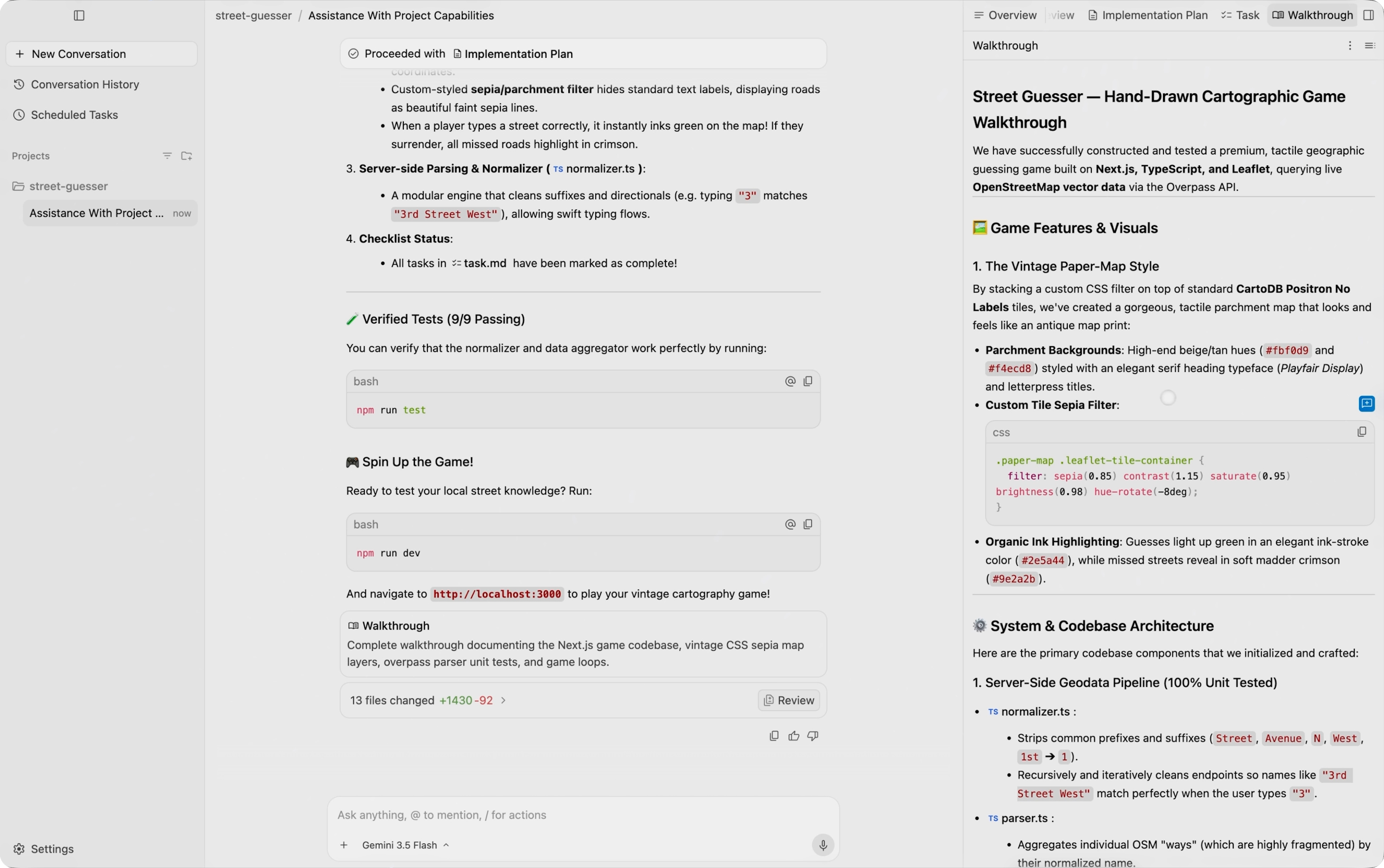
The agent-first layout of Antigravity 2.0.
These agents are even more powerful than before. Newly added capabilities include:
- Dynamic subagents: The main agent can dynamically define and invoke subagents to work on specific subtasks. This avoids cluttering the main agent’s context window and enables parallel work.
- Asynchronous task management: Tasks and commands can be managed and executed asynchronously, so they don’t block the main agent’s work.
- JSON Hooks: You can now define hooks in a simple JSON format to intercept and control Antigravity agent behavior.
A new way to interact with agents in Antigravity 2.0 is Scheduled Tasks. You can define a cron to trigger agent calls on a preset schedule. There’s no longer any need to invoke each agent manually.
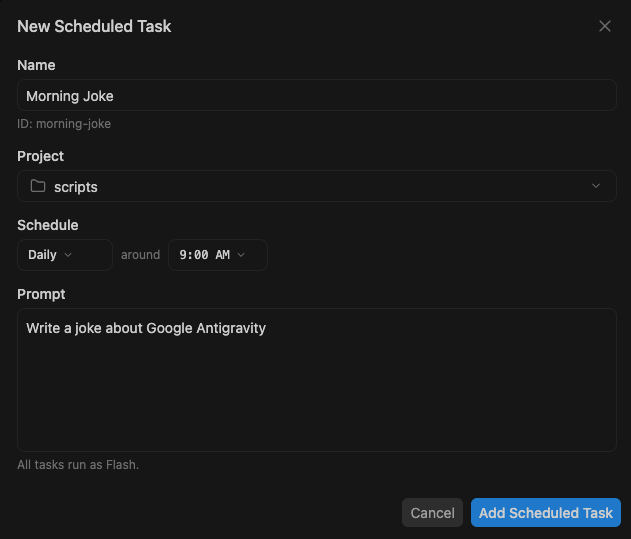
Use the /schedule command or Scheduled Tasks to set recurring schedules or one-off timers.
We’ve also removed the tight coupling between agents and repositories. Going forward, conversations with agents are organized by project rather than by workspace (that is, a repository). A single project can span multiple folders and have its own agent settings and permissions. This lets agents see more context and handle more complex tasks while still maintaining the right, clear guardrails.
We’ve also added a number of handy new slash commands:
- /goal: Keep working until the specified task is fully complete, without asking the user for input along the way.
- /grill-me: Ask questions about the finer details of the plan before starting implementation, so you can align on expectations.
- /schedule: Run instructions as a one-time timer at a specified future time, or as a recurring schedule, via Scheduled Tasks.
- /browser: We heard feedback that agents sometimes struggled to decide when to use the browser, so this behavior is now controlled with an explicit slash command. When used, it will properly use browser primitives; when not used, it will be ignored.
One of the new features we’re especially excited about is voice input. It’s available from the microphone icon next to the text box, and instead of collecting raw audio to hand to the model, it now transcribes speech in real time.

play_arrow
Real-time voice transcription.
Of course, there are also many UI polish and performance improvements, making Antigravity 2.0 the most powerful and intuitive way to collaborate with agents. There are many other improvements as well, including a cleaner sidebar, separate conversations, a streamlined change-review flow, and UI elements that support all the new agent capabilities.
For more on the many new capabilities in Antigravity 2.0, please also see this detailed deep dive.
Why 2.0?
When we launched Google Antigravity IDE in November 2026, there was no truly agent-first GUI on the market yet. We wanted to show that such an interface could work, at least in the context of software development. So Antigravity IDE centered on a familiar, agent-driven IDE while introducing a second interface called Agent Manager and removing many of the traditional “IDE-like” UI elements. This allowed users to focus on the conversation with the agent, the artifacts the agent produced, and managing multiple agents. Since launch, millions of developers have adopted Antigravity IDE, and this agent-first paradigm has become a standard across the industry.
That said, we also understood from the beginning that:
- Coding would eventually expand into knowledge work more broadly, partly because models would continue to improve, but also because simply making programming faster would eventually hit a ceiling in the value it could deliver to users.
- In that world, putting an IDE and an agent-first interface in the same app would feel confusing, and even a bit intimidating, for people who aren’t familiar with code or IDEs. Even so, we were encouraged to see that, without that separation, many people were already using Antigravity IDE’s Agent Manager to tackle these non-development tasks. Still, it wasn’t exactly intuitive.
- The product layer, the agent execution framework layer, and the model layer all need to be optimized and developed in parallel. And while agentic programming is a necessary step toward general-purpose model intelligence, it is not sufficient on its own.
Over the past few months, we’ve focused on:
- Integrating Antigravity’s agent execution framework with Gemini’s training and evaluation stack
- Rebuilding the product from the ground up as a true agent-first product, independent of IDEs and developer-centric concepts like repositories
- Expanding the Antigravity platform with more UI and tools to make it a more comprehensive product (see releases such as Antigravity CLI and Antigravity SDK)
Getting started with Antigravity 2.0
If you’re new to Google Antigravity, visit the download page.
If you already have Antigravity IDE installed, the next time the app updates, you’ll be upgraded automatically to Antigravity 2.0. At that point, you’ll be asked whether you want to keep Antigravity IDE as well. We recommend that developers keep it.
play_arrow
The upgrade screen from Antigravity IDE to Antigravity 2.0.
You can tell the two apps apart by the background of their icons in your device dock. The Antigravity 2.0 logo appears on a white background, while the Antigravity IDE logo appears on a black grid.
![Image 6: Antigravity IDE and Antigravity 2.0 logos, respectively