
Today, we’re introducing a preview of a new personal finance experience in ChatGPT for Pro users in the United States. It lets you securely connect your financial accounts, view a dashboard that shows where your money is going, and ask ChatGPT questions based on your own financial situation. And of course, you’re always in control of your data. We’re starting with a small preview group, learning from real usage, improving the experience, and expanding access carefully over time.
Money affects nearly every part of life — where you live, the decisions you make, how you support the people you love, and the future you imagine. Yet managing finances today often means piecing together accounts, apps, credit cards, loans, and spreadsheets just to understand your situation. Even then, it can still be hard to see the full picture or know what to do next.
People are already turning to ChatGPT for help. More than 200 million people each month use ChatGPT for budgeting, investment questions, comparing options, and planning for future goals. With the latest advances in GPT-5.5, ChatGPT is now better equipped than ever to handle this kind of context-dependent, complex personal finance reasoning.
When you connect your financial accounts, ChatGPT can combine this reasoning with your real financial background, plus the goals, lifestyle, and priorities you’ve already shared, to help you spot trends, understand tradeoffs, and think through important decisions in a more personalized, more comprehensive way. For example, you can ask questions like:
Goal planning Travel cost analysis Spending insights Scenario planning Investment risk Subscription review
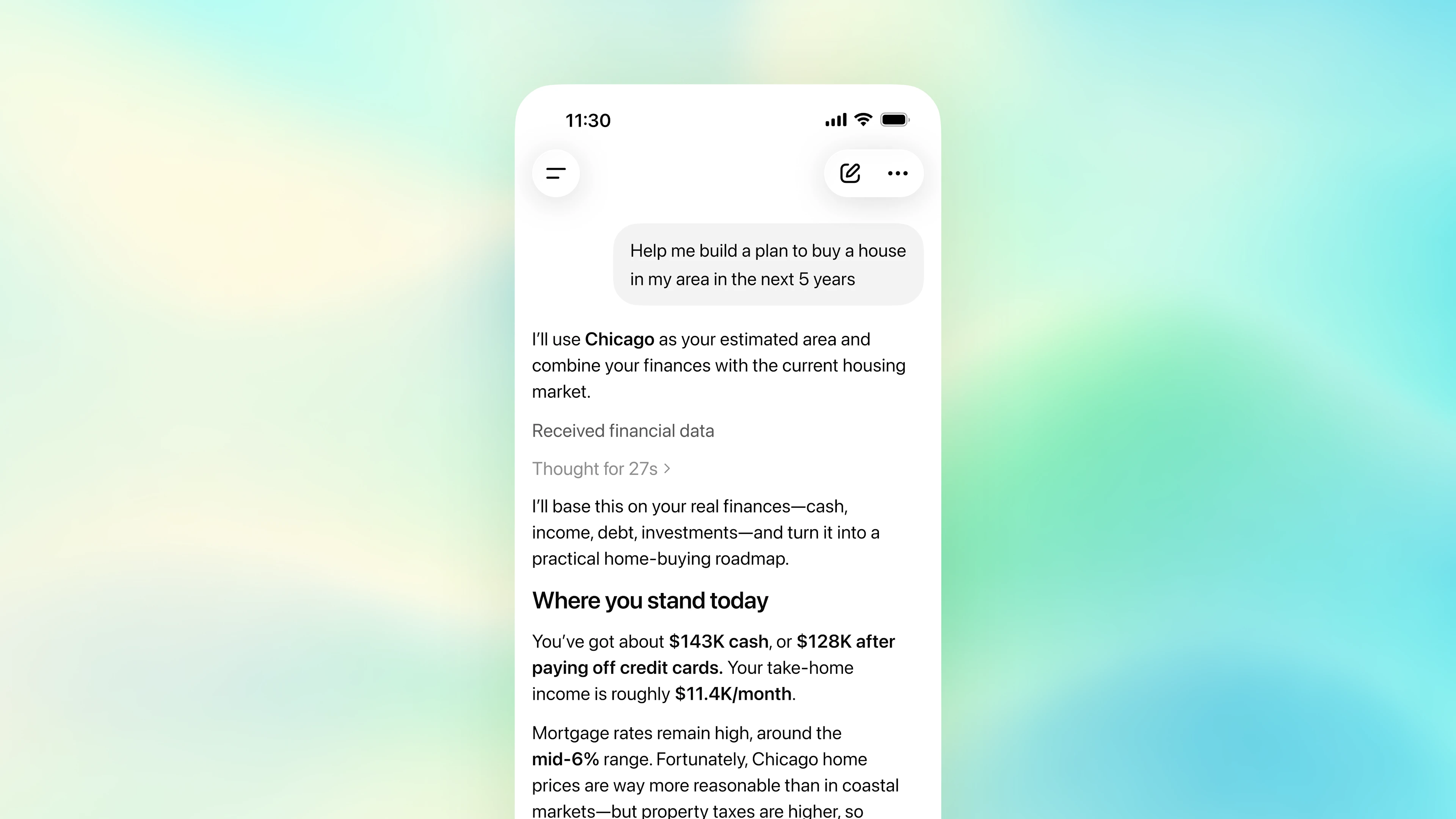
ChatGPT can help you make sense of your situation and manage money with more confidence, but it is not a substitute for professional financial advice.
Starting today, we’re enabling financial account connections in ChatGPT on the web and iOS for Pro users in the United States. We support more than 12,000 financial institutions. We’ll keep improving the experience as we learn from early usage, then expand to Plus users, and ultimately aim to make it available to everyone.
Getting started
Connect your financial information
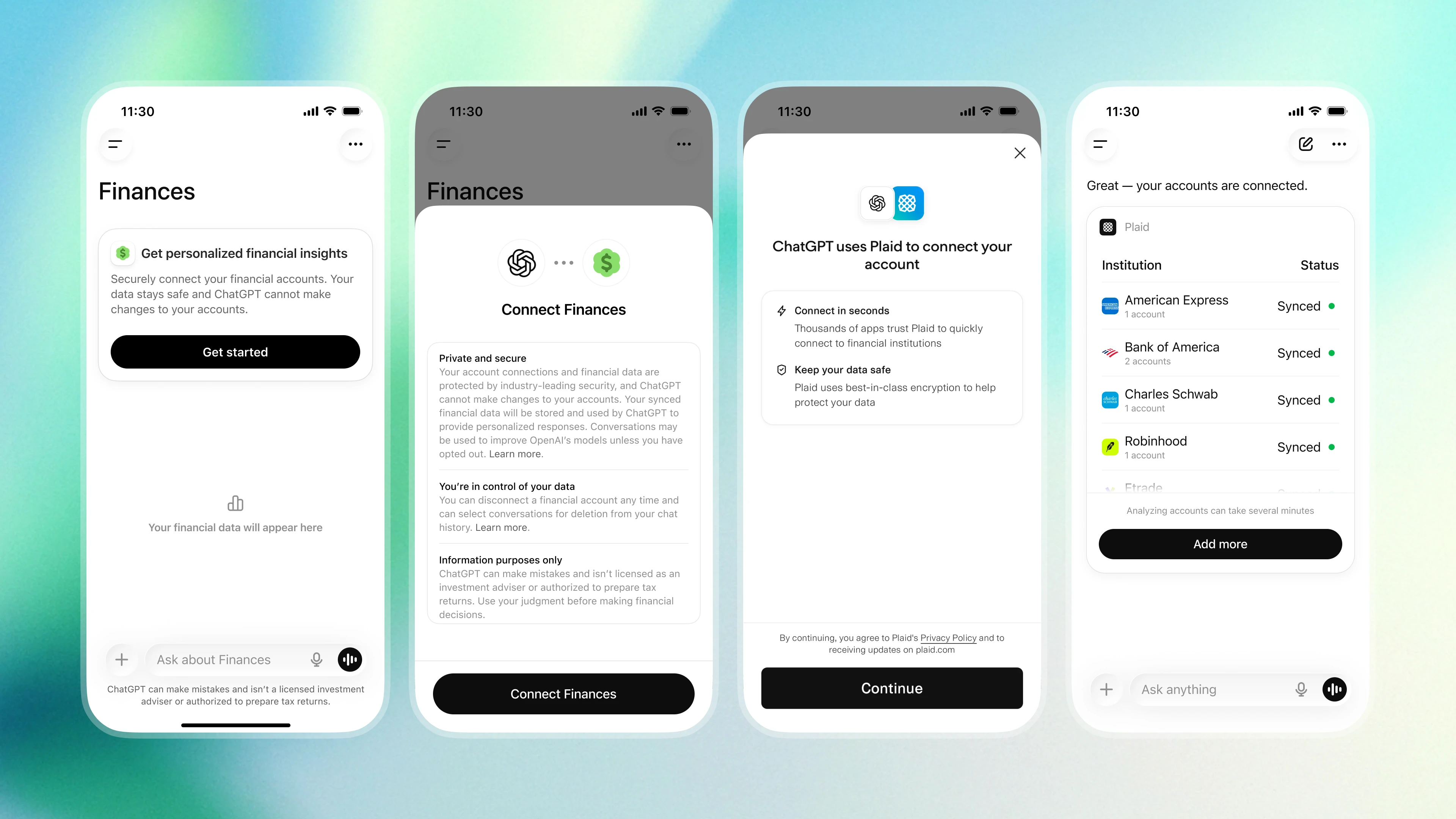
To get started, open Finances in the ChatGPT sidebar and select Get started, or start a conversation anywhere in ChatGPT and type @Finances, connect my accounts.
ChatGPT will then guide you through connecting your accounts securely via Plaid. Support for Intuit is coming soon. Once you’ve authenticated, ChatGPT will begin syncing and categorizing your data. This may take a few minutes.
Once your accounts have finished syncing, you’ll see a dashboard that gives you a quick view of investment portfolio performance, spending, subscriptions, and upcoming payments.
Beyond your connected accounts, you can also share important context about your financial life, such as a mortgage, savings goals, or a major purchase you’re planning. For example, you might say, “I’m saving up to buy a car at the beginning of next year,” or “I still owe my parents [X amount], which is money they lent me.” ChatGPT will save this context in financial memory and can reference it in future conversations.
That broader context is a big part of what makes this experience valuable. Instead of treating each question in isolation, ChatGPT can connect the dots across your accounts, goals, and the information you’ve already shared, so it can offer advice that’s more personalized and more complete.
If you haven’t connected Finances
I’d like to make a plan to save a little more money over the next few months.
Here’s a practical way to increase your savings over the next 2–3 months without overdoing it.
- Set a specific goal
Make the goal concrete and time-bound.
For example:
- “Save an extra $1,500 by August”
- “Build a one-month emergency fund”
- “Save for travel / taxes / moving / investing”
Vague goals like “spend less” tend to fade quickly.
- Focus on the three highest-impact areas
Most people don’t need to optimize everything. In many cases, 70%–80% of the extra savings comes from just a few categories.
Food delivery and dining out
Good targets include:
- Cutting delivery from 5 times a week to 2
- Bringing coffee or lunch from home a few days a week
- Setting a fixed budget for “fun” meals out
Even a small reduction here can free up a few hundred dollars a month.
Subscriptions and recurring charges
Look closely at:
- Duplicate streaming or membership services
- Annual plans you forgot about
- Apps you rarely use
- Premium tiers you don’t need
Even 20 minutes of cleanup can permanently lower your monthly spending.
Impulse purchases
Instead of just trying to “buy less,” add friction before you buy.
- Use a 48-hour rule for purchases above a certain amount
- Remove saved cards from shopping apps
- Make a running wishlist instead of ordering right away
This helps reduce spur-of-the-moment spending without making you feel deprived.
- Automate savings immediately
The most important change is often automation.
Try things like:
- Automatic transfers on payday
- A separate high-yield savings account
- Moving money before you see it
Even amounts like:
- $75/week = about $900 in 3 months
- $150/week = about $1,800 in 3 months
Consistency with smaller amounts is often more effective than occasional big moves.
- Set a “low-spend default”
Don’t try to optimize every decision.
For example,
- Weeknight dinners =