
Using Claude to Track Down a Mysterious Beep
November 9, 2026
We have a storage room full of boxes we never unpacked after our last move. A few weeks ago, something in that room started beeping intermittently. The beeps came so far apart that I could never tell where the sound was coming from while standing in the room, and I really didn’t want to dig through every box. So I asked Claude Code to build Beep Locator, a software system that uses multiple devices scattered around a room to triangulate the source of a mystery beep.
Here’s what the Beep Locator interface looks like after it has been running for a while:
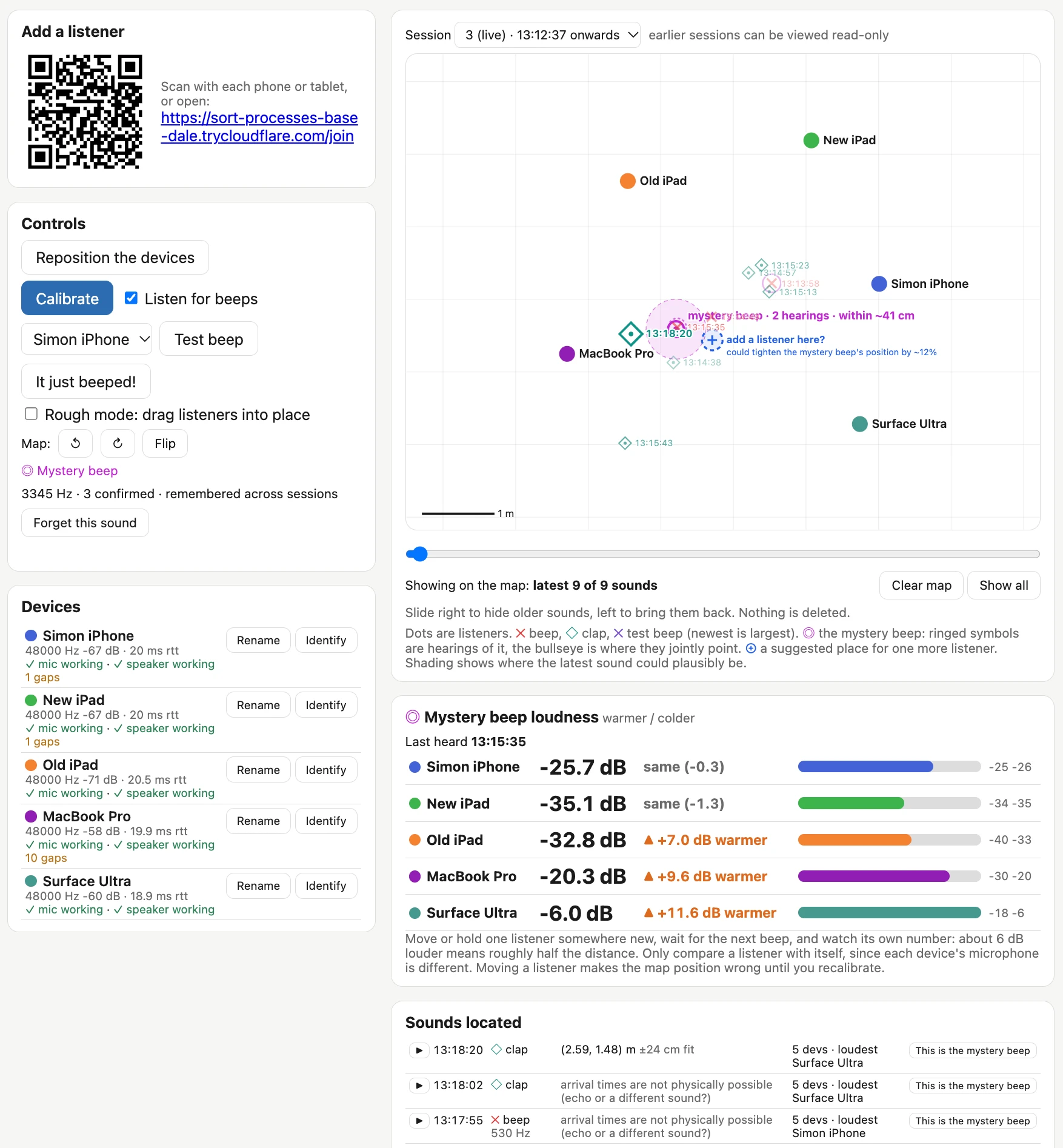
You start by running a Python web server that displays the main interface. Then you connect as many spare devices as you can, via QR code or URL, to act as listeners. I used two iPads, a phone, a MacBook Pro, and a Surface Ultra.
The devices play sounds to each other to help estimate their positions. That approach didn’t work very well, so I added a “Rough mode” where you drag device icons around the space to supply approximate positions, which the system then refines using those sounds.
Once setup is done, all the devices start listening for beeps!
I also added a clap mode so I could test by clapping at different spots in the room. Claps show up on the map as diamonds. This gave me confidence in its ability to locate sounds.
Beeps appear on the map as an X, and a new row is added to the “Located sounds” log. You can play the sounds back (one device at a time) to confirm they’re the mystery beep you’re looking for, then click “This is the mystery beep” to tag them.
Once the mystery beep’s frequency has been confirmed, the system keeps listening for it, measures the interval between beeps, and uses the triangulated positions to pin down its most likely location on the map.
The system worked as intended. It placed the beep within about 40 centimeters, and when I dug through that pile of boxes, I found an old carbon monoxide detector desperately in need of a new battery.
How It Works
When I started working on this problem with Claude, it quickly found BeepBeep: A High-Accuracy Acoustic-Based System for Ranging and Localization Using COTS Devices, a 2007 paper by Chunyi Peng, Guobin Shen, Yongguang Zhang, Yanlin Li, and Kun Tan. Here’s the abstract:
We present the design, implementation, and evaluation of BeepBeep, a high-accuracy acoustic-based ranging system. It operates in an ad-hoc, device-to-device setting and requires no pre-deployed infrastructure. It is a pure software solution that uses only the most basic commodity hardware (a speaker, a microphone, and some form of device-to-device communication), so it can easily be applied to many low-cost sensor platforms and most commercial off-the-shelf (COTS) mobile devices, such as cell phones and PDAs. It achieves high accuracy through a combination of three techniques: two-way sensing, self-recording, and sample counting.
That sounded like exactly what we needed to build!
Beep Locator runs a Python web application server that does most of the heavy lifting. Listener devices connect to it over WebSockets and present an interface that asks for browser microphone permission. The listeners’ main job is to record a rolling buffer of the last 60 seconds of audio. They also run a simple beep-detection algorithm (see detector.js) that uses a Fast Fourier Transform and a high-pass filter to identify potential beeps and report those events to the main server.
When a beep is reported, the server has one device (the one with the shortest round-trip time to the server) play a short chirp, then asks every listener to upload an audio clip spanning from about 0.6 seconds before the beep to 0.8 seconds after the chirp. The chirp lets the clips be aligned with one another, which is the key step in locating the beep.
How I Built It
I kicked off the project from my iPhone using Claude Code Cloud with Opus 5.5 and Extra thinking effort turned on. Here’s the shared initial session, which began with the following prompt against a brand-new, empty GitHub repository:
Write out a problem.md file describing the problem we want to solve
There is a device beeping in a room and I cannot find it
I want to set up several devices - laptops, phones, iPads - around the room all listening at the same time and have them help triangulate where the beep comes from
There needs to be a Python web app which coordinates it all - one device shows a web page for the app, other devices join a URL which turns them into listeners - all via browser WebAudio and WebSockets back to the Python server app
Ideally I wouldn't need to manually input the relative locations of the devices - it would be amazing if they could play sounds to each other in order to locate each other in 2D space - is that even possible though?
That produced the problem.md file. While writing it, Claude found and read the BeepBeep paper, which the file also describes.
The research looked good, so I told it:
Ok try and build it, add a mechanism so you can send new code to the listeners which they will then run automatically - that way I can set everything up in the room and then leave you alone to continue hacking and experiment while I do something else
That brought me to this point, where most of the system was built but nobody had actually tried running it yet.
I cloned the new repo onto my laptop and fired up Claude Code… and then Fable 5.2 was released, and this project looked like a great way to put it through its paces.
I asked Claude Code on the laptop to start the server and make sure it could both see what was happening during runs and modify the software live while it was running.