
Lately, most of the changes I make to my projects take the form of PRs (Pull Requests) created for me by Claude Code or Codex. PRs are my unit of work—I use them to bundle multiple commits together, iterate until a feature is finished, document decisions, and eventually merge the completed work. Today’s coding agents are exceptionally good at writing PR descriptions.
They’re too good at describing the work
The problem is that they are too good at it. The PR descriptions generated by agents are both accurate and exhaustive. They describe the problem, the detailed solution, and the steps taken to verify that solution. It’s just an overwhelming amount of information to digest.
It isn’t necessarily slop, but it sure reads like it!
You can spot an AI-written PR from a mile away. As with other forms of AI writing, my immediate reaction usually boils down to: “I’m not reading all that.” No matter how accurate or useful the information is, the realization that it might take me longer to read it than it took the author to generate it immediately kills my interest… even when that lead author was me!
What I want is human editorial judgment. I want someone to have spent even a brief moment thinking about the PR, providing a human-reviewed summary so I can understand at a high level what it does and whether it’s worth my time to dig deeper.
I think I’ve found a low-effort approach that works brilliantly.
Tucking most of it behind details/summary tags
The HTML <details><summary> elements render a collapsible heading (the summary) that can be expanded to reveal a larger block of text. Here’s what that looks like in code:
<details> <summary>Claude Opus 5.5</summary> <h2>The hook</h2> Plugins implement <code>register_agent_reference_types(datasette)</code>...</details>Here’s how it looks when rendered:
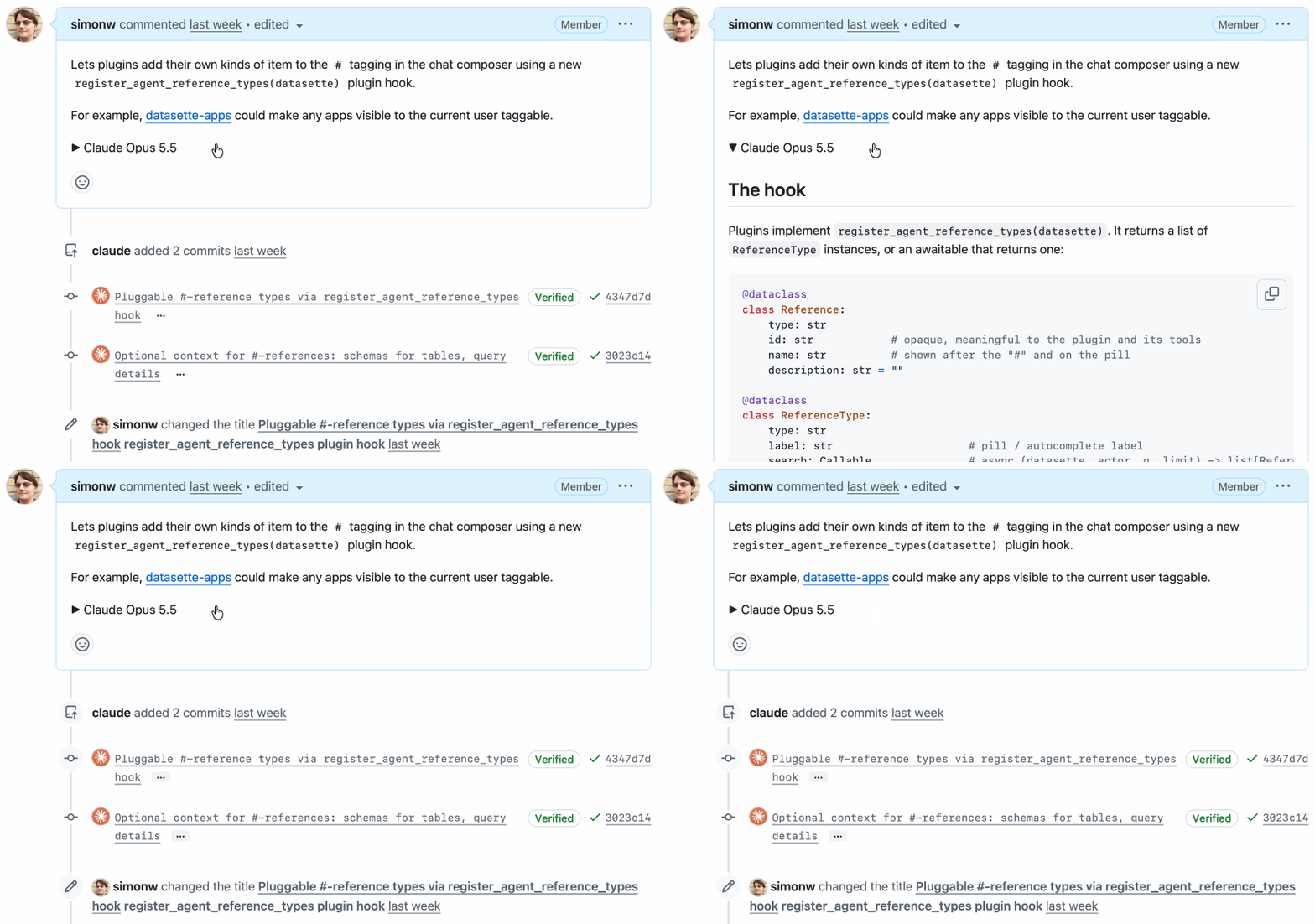
Crucially, GitHub Markdown natively supports <details><summary>. You can drop these tags straight into an issue comment or PR description, and GitHub will automatically hide the detailed contents, showing only the summary line and an expand arrow.
I’ve started using this pattern for all my AI-generated PRs.
The opening paragraph of my PR is carefully curated to provide a high-level explanation of the overall changes—giving human readers a quick overview using the absolute minimum reading time.
Sometimes I’ll also include a screenshot, since an image is often the quickest way to showcase a new feature.
After that, the full wall of text written by the agent is tucked inside <details><summary>. I usually use the model name (often along with its thinking/effort level) as the summary text to provide clear context—for example, “Claude Opus 5.5 Medium”.
Now my PRs don’t feel like AI slop at all! All the detailed information is still preserved, but readers can grasp the core, human-curated highlights at a glance without being overwhelmed by multiple paragraphs of agent-written prose.
I don’t always write the intro from scratch—sometimes the agent has already produced what I wanted, buried somewhere in that mountain of text. My promise to the reader is that this brief opening reflects my human judgment, signaling what is actually worth their time.
Here are a few recent examples where I used this pattern, along with the introductory snippets I used:
- datasette PR #3052: Redesign row page as a vertical list of fields - “Row pages previously displayed a single row as a single-row table. For wide tables (like the 46-column GitHub
repostable), this stretched far to the right, leaving most of the page blank.” (followed by a screenshot) - datasette PR #3043: Pagination bar showing which rows are on the current page - “Multi-page table views now clearly indicate where you currently are, providing navigation controls at both the top and bottom of the page.” (with a screenshot)
- datasette PR #3042: Load edit-tools.js on demand via a small loader - “
edit-tools.js(~220KB) was previously loaded on every table, row, and database page, even for users who couldn’t edit anything. It’s now loaded on demand only for users with edit permissions the first time they interact with an editing feature (including hovering over an edit link).” - datasette-agent PR #51: register_agent_reference_types plugin hook - “Allows plugins to add their own item types to the
#menu in the chat input using a newregister_agent_reference_types(datasette)plugin hook.” - as shown above. - llm PR #1838: Add llm openai endpoint add/list/remove/path commands - “Adds commands for managing entries in
extra-openai-models.yaml, making it possible to save OpenAI-compatible endpoints via the CLI without manually editing YAML.” - followed by the pasted--helpoutput.
A mnemonic
I used to constantly forget the order of these two tags—was it <details><summary> or <summary><details>?
Two small tricks helped me out.
First, and most obviously, <summary> is meant to summarize the detailed contents. It’s the tag for the clickable line of text—so the <details> element naturally has to wrap everything else.
An even better trick is to always pronounce the pair as “details-summary”.
“Details-summary” is two syllables followed by three. It flows off the tongue much more naturally than the 3-2 rhythm of “summary-details”.
Say “details-summary” out loud a few times, and you’ll never mix up the order again.
(I still wish GitHub would add a button for this in their Markdown editor—partly to save me the hassle of pecking it out on a phone keyboard, and partly to help more GitHub users discover that this feature exists.)