
Can’t Afford Grok Bot? You Might as Well Give ds bot a Shot
While DeepSeek’s official Muse hasn’t arrived yet, community developers couldn’t wait any longer.
Fresh out of the oven is “DeepSeek-Bot”: a multi-agent bot team built on DeepSeek Harness.
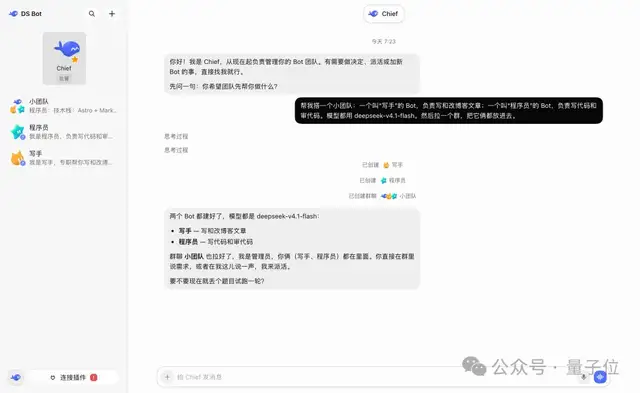
△ Image credit: Author @Fei2411
Similar to Grok Bot, ds bot provides a collaborative multi-bot team interface powered by DeepSeek Harness.
Each bot can have its own name, persona, and underlying model. More importantly, they feature persistence—the ability to retain long-term memory.
To save tokens, you can also assign a “supervisor” to your bot team: route your requests directly to the supervisor, who will coordinate with the other bots.
The author, FeiZ, highlighted a few key points:
- You can connect any model you want to ds bot, with future support planned for local agents.
- ds bot inherits DSH’s “everything is a plugin” design philosophy to maintain high extensibility.
While it isn’t an official release, it might capture the authentic DeepSeek “blue whale” spirit even better.
Less than a day after launch, DeepSeek enthusiasts have already starred the repository over 250 times. If Grok Bot is too pricey, this ds bot is definitely worth a try.
DSH-Based Bot Plugin
Staying true to the “everything is a plugin” philosophy, ds bot is also packaged as a plugin. Here are its core features:
Got a Problem? Check with the Bot Supervisor First
In ds bot, each bot has a distinct identity, supporting custom names, role descriptions, system prompts, avatars, and underlying models.
Bots maintain persistent runtime states and long-term memory capabilities.
Users can also set up a Main Bot (Supervisor Bot). Equipped with elevated permissions, the supervisor helps manage and configure other bots as well as group chat settings. This reduces the complexity of multi-agent management while effectively cutting down token consumption in group chats.
ds bot includes targeted optimizations for this workflow: once an admin is designated in a group chat, it replies by default and orchestrates tasks across other bots. Of course, users can still @mention specific bots directly for 1-on-1 conversations.
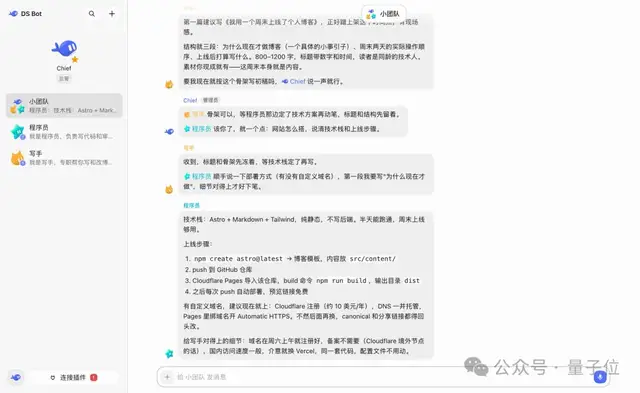
△ Image credit: Author @Fei2411
The author strongly recommends configuring other bots and group chat environments directly by talking to the Supervisor Bot.
Additionally, while bot models can be swapped at any time, the author offers a recommendation:
It’s recommended to stick to the same model long-term and only switch when strictly necessary.
Long-Term Memory Mechanism
Long-term memory is one of ds bot’s flagship features. Memories can be managed visually on the details page or adjusted conversationally through natural language.
Under the hood:
- Each bot maps to an underlying DeepSeek Harness Session with an independent working context.
- When conversation length exceeds the context window, ds bot manages context using compression algorithms, handover summaries, and local search.
- Each bot maintains local memory storage backed by Markdown files, with support for team-shared memory mode.
- After each conversation round, the model automatically runs a memory review to assess and filter what information to save, update, or forget.
Other technical features include:
- Usage Statistics: View detailed token consumption breakdowns by time, bot, and model under
Settings → Usage. - Local Data Storage: All data is stored locally in the
bot/andsessions/directories under the DSH home folder; uninstalling the plugin will not result in data loss. - Open Source License: The project is licensed under Apache License 2.0.
Installation & Usage
ds bot supports both the DSH desktop app and the web interface.
Desktop:
Click Plugins → Add Plugin in the sidebar, then enter ds-bot to complete the installation.
Web:
Requires Node.js 22.19 or higher and pnpm. Run the following commands to add and launch the plugin:
npx @deepseek-ai/dsh@0.2.1-alpha.1 plugin --profile web add ds-botnpx @deepseek-ai/dsh@0.2.1-alpha.1 webFor more technical details and configuration guides, check out the project repository:
https://github.com/FeiZhuLulu/DeepSeek-Bot/tree/main